


The most expensive work in your company is probably being done by your lowest-paid employees.
Not because they’re inefficient.
Because the system is.
Every day, across healthcare, legal, finance, education and government offices, highly capable people are doing work that should not exist anymore:
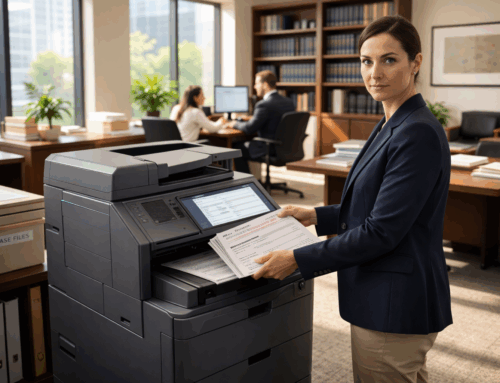
Scanning. Renaming. Uploading. Filing. Fixing. Searching. Re-doing.
Not once. Not occasionally.
Constantly.
And because this work is spread out, familiar, and “just how things are done,” it never gets flagged as a serious financial problem.
But it is.
The Work No One Tracks Is the Work That Bleeds You
Manual document workflows rarely look dramatic.
They look like:
- scanning to desktop
- renaming files manually
- emailing documents to move them
- re-entering the same data into multiple systems
- fixing filing errors
- chasing missing documents
- asking, “where is the latest version?”
None of this triggers alarms.
But it should.
Because this is where operational drag compounds quietly, every single day.
Why This Work Is More Expensive Than It Looks
1. Labor Cost Adds Up Fast
Five minutes here. Ten minutes there.
Multiply that across:
- teams
- departments
- weeks
- months
Now multiply again by salaries.
You are paying skilled people to do repetitive handling work that adds no strategic value.
2. Errors Multiply Faster Than You Think
Manual handling creates:
- duplicate records
- missing documents
- bad indexing
- wrong destinations
- version confusion
And here’s the uncomfortable part:
Every error costs more to fix than it did to create.
3. Delays Ripple Through Everything
Documents don’t just sit.
They block:
- approvals
- onboarding
- billing
- compliance checks
- case progress
- patient intake
A slow document workflow becomes a slow business.
4. Opportunity Cost Is the Real Killer
Your best people are spending time on the worst work.
Not strategy. Not analysis. Not client-facing value.
Just… moving documents around.
Why Companies Keep Accepting This
It’s Everywhere, So No One Owns It
Manual document work is distributed across the organization.
That makes it invisible.
It Feels “Good Enough”
The system technically works.
So no one questions it.
Software Created a False Sense of Progress
You adopted systems.
But the intake and routing are still manual.
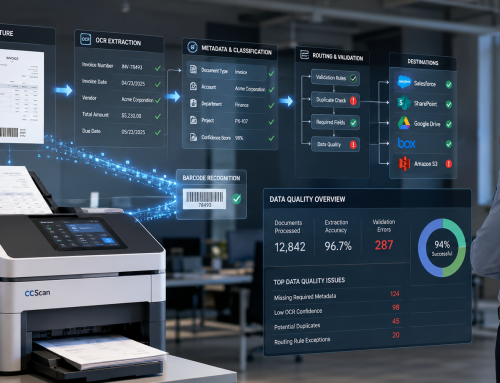
Which means the foundation never changed. There are still multiple steps to get a single document uploaded to your internal server or cloud based document and data management systems like Salesforce or Google Drive and others.
Workarounds Became the System
Shared folders.
Scan-to-email.
Naming conventions no one follows.
These aren’t solutions. They’re coping mechanisms.
The Real Problem Isn’t Storage. It’s Ingestion.
Most companies think their issue is document storage.
It isn’t.
It’s how documents enter the system in the first place.
If intake is messy:
- OCR struggles
- search becomes unreliable
- workflows break
- compliance weakens
- AI outputs degrade
Everything downstream inherits the problem.
What Good Document Workflow Automation Actually Does
Real automation doesn’t just “digitize.”
It removes friction and saves you a ton of manual time.
A strong system should:
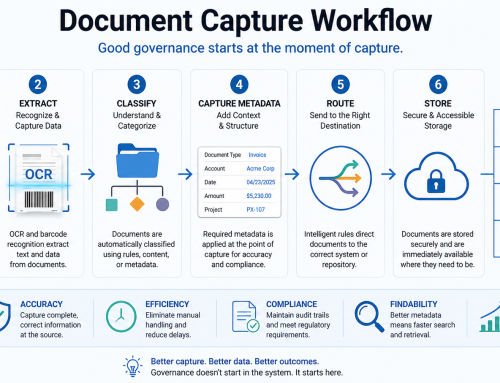
- capture documents once
- classify them automatically
- route them to the right destination
- eliminate local file handling
- log activity consistently
In other words:
It replaces manual effort with predictable outcomes.
Signs You’re Still Paying Too Much for Manual Work
Be honest. If any of these sound familiar, you have a problem:
- Staff scan to desktop before uploading
- Files are renamed manually
- Occasional mistakes in naming occur
- Documents move through email
- Multiple systems hold “copies”
- Missing documents are common
- People ask for the “latest version”
- Admin teams spend hours filing and fixing
- Retrieval depends on knowing who touched it last
That’s not a workflow.
That’s controlled chaos.
What to Fix First (Without Breaking Everything)
Start where friction is highest:
- intake workflows
- onboarding documents
- contracts
- billing records
- case files
- patient/student/client records
Then:
- standardize capture
- enforce routing
- remove discretionary handling
- ensure documents land in governed systems like Salesforce, SharePoint, Google Drive, Box, or Amazon S3
Fix the front of the process.
Everything else improves downstream.
Where ccScan Fits
ccScan doesn’t try to replace your systems.
It fixes how documents get into them.
It enables:
- automated capture
- OCR and barcode processing
- intelligent routing
- reduced manual handling
- more consistent document workflows
The result is not just faster processing.
It is:
- lower labor waste
- fewer errors
- cleaner data
- more reliable systems
- modern workflows
Final Thoughts
Manual document workflows feel harmless because they’re familiar.
But they quietly create:
- cost
- delay
- error
- frustration
Across your entire organization.
Automation is not about replacing people.
It is about removing the work they should never have been doing in the first place.
If your teams are still scanning, renaming, emailing, filing, and correcting by hand, you are carrying more operational waste than you think.
Explore how ccScan helps eliminate manual document handling and streamline workflows at:
https://ccscannow.com/document-capture-management/