


Most organizations spend a surprising amount of time talking about data quality.
They invest in CRM cleanups. They buy reporting tools. They hire consultants to improve dashboards. Some are now pouring money into artificial intelligence projects in the hope that smarter systems will somehow compensate for imperfect information.
But here’s a question that rarely gets asked:
What if your data quality problem starts before the data ever reaches Salesforce, SharePoint, Google Drive, or any other system?
It sounds almost too simple. Yet in many organizations, the first place information becomes digital is also the first place accuracy begins to erode. A scanner captures a document. OCR interprets the contents. Someone names a file. Someone decides where it belongs. Someone enters metadata. Every one of those steps creates an opportunity for small errors to enter the system.
Individually, those mistakes seem insignificant. Together, they become expensive.
Most Data Quality Initiatives Start Too Late
When a report contains incorrect information, most teams investigate the report.
When customer records don’t match, they investigate Salesforce.
When documents can’t be found, they investigate storage systems.
The scanner rarely enters the conversation.
That’s understandable. Scanners feel mechanical. They seem like neutral devices sitting quietly in the corner of the office. Paper goes in. Digital files come out. End of story.
Except it isn’t.
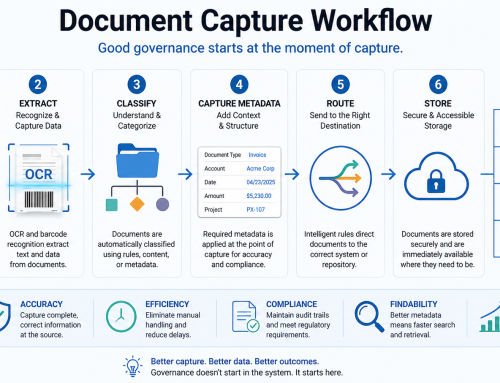
The reality is that the scanner represents the first stage of your document capture workflow. If information is captured incorrectly at this stage, every downstream system inherits the problem. Salesforce inherits it. SharePoint inherits it. Your reporting platform inherits it. Your AI tools inherit it.
Bad inputs have a remarkable ability to travel.
Five Ways Scanners Quietly Damage Data Quality
OCR Isn’t Magic
OCR has improved dramatically over the years, but it still depends on the quality of what it’s given.
A skewed invoice. A faded contract. A handwritten note. A poor-quality photocopy.
A “5” becomes an “S.”
An account number loses a digit.
A decimal point disappears.
Nobody notices immediately because the document exists. The problem only surfaces later when reports don’t reconcile or records don’t match.
And by then, the source of the error is difficult to trace.
Missing Pages Create Invisible Problems
Unlike obvious failures, missing pages are subtle.
The scanner captures eight pages instead of nine.
A staple causes a page to skip.
A document feeder jams briefly.
The resulting file appears complete at a glance. The system stores it without complaint. The user moves on.
Weeks later, someone discovers a missing signature page, missing appendix, or missing supporting document.
Now the organization isn’t dealing with a scanning problem. It’s dealing with a business problem.
Manual Classification Creates Inconsistency
People are remarkably creative when naming files.
Unfortunately, consistency and creativity are rarely friends.
One employee saves a file as:
Invoice_Acme_March2026
Another uses:
March Invoice Acme
Someone else chooses:
Scan001
The system isn’t broken. The workflow is.
Without standardized document capture and classification, retrieval becomes slower, reporting becomes less reliable, and automation becomes harder to implement.
Metadata Gets Added Later. Or Never.
This is one of the biggest causes of downstream chaos.
Many organizations scan documents first and worry about indexing later.
The problem is that “later” often means never.
Without consistent metadata, documents become digital filing cabinets with missing labels. The files exist, but finding them depends on luck, memory, or persistence.
None of those scale particularly well.
Manual Routing Introduces Human Variability
A surprising amount of document movement still depends on people making decisions.
Which customer record should receive this document?
Which department should own it?
Which folder should it enter?
Humans can make those decisions. Humans can also make different decisions from one another.
The result is inconsistency masquerading as process.
Why AI Makes This Problem More Important
Every week seems to bring another announcement about AI.
AI-powered search.
AI-powered document processing.
AI-powered workflow automation.
Those tools are impressive. But they share one limitation that rarely appears in the marketing materials.
They can only work with the information they receive.
If the original document was captured poorly, classified incorrectly, or routed without proper metadata, AI doesn’t magically restore accuracy. In many cases it accelerates the spread of bad information because it processes errors faster and at greater scale.
The old principle remains true.
Garbage in, garbage out.
The technology has changed. The rule hasn’t.
What Good Document Capture Looks Like
Strong data quality begins before storage.
It begins at capture.
A modern document capture workflow should:
- Capture documents directly from supported scanners and multifunction devices
- Apply OCR automatically
- Use barcode recognition where appropriate
- Enforce metadata requirements
- Classify documents consistently
- Route documents directly to approved destinations
Notice what is missing from that list.
There is no “scan now, organize later.”
That’s intentional.
The more decisions that happen automatically and consistently at capture, the fewer problems emerge downstream.
Where ccScan Fits
ccScan was designed around a simple idea: document governance starts when a document is scanned, not when it is stored.
Instead of relying on users to manually rename, upload, classify, and route files, ccScan helps automate those steps at the point of capture.
Documents can be scanned directly into Salesforce, SharePoint, Google Drive, Box, Amazon S3, or file systems. OCR processing, barcode recognition, metadata capture, and routing rules can be applied immediately, creating a more consistent and reliable document workflow.
The goal isn’t simply faster scanning.
The goal is better information.
A Quick Data Quality Audit
If you’re curious whether this problem exists in your organization, ask a few simple questions:
- Are employees scanning to desktops?
- Are files renamed manually?
- Is metadata optional?
- Are documents routed by email?
- Do users regularly ask where documents are stored?
- Are the same documents scanned more than once?
If the answer to several of those questions is yes, your data quality challenges may begin much earlier than you think.
Conclusion
Most organizations look for data quality problems inside databases, dashboards, and CRM systems.
The reality is often less complicated.
The most expensive data quality issue may have entered the business the moment a piece of paper became a digital file.
Because once inaccurate information enters the system, every tool that follows inherits the consequences.
Storage matters.
Reporting matters.
AI matters.
But none of them can consistently overcome poor document capture.
That’s why data quality doesn’t start in your database.
It starts at your scanner.
Call to Action
If your teams are still scanning, renaming, routing, uploading, and correcting documents by hand, there may be more risk hiding in your document workflows than you realize.
Learn how ccScan helps organizations improve document capture workflows and route documents directly into Salesforce, SharePoint, Google Drive, Box, Amazon S3, and file systems at ccscannow.com.