


Every generation of office software has its ghosts.
Some haunt us politely from old shortcuts buried three folders deep. Others live inside a macro-enabled spreadsheet named “FINAL_final_v7_really_final.xls.” A few become full corporate folklore: the one browser that only worked for one vendor portal, the form tool that half the company used but nobody officially owned, the print service that seemed invisible until the day it vanished.
Software retirements rarely arrive like movie villains. No thunder. No dramatic cape. Usually, there is a notice, a date, a migration guide, and one very tired IT manager staring at an inventory list thinking, “How many departments are still using this?”
Think of Internet Explorer. For years after the web had moved on, organizations still depended on it because one business-critical portal, expense system, claims platform, or government site had been built around it. When Microsoft finally ended support for Internet Explorer 11 on certain Windows 10 versions in 2022, the technical story was simple: move to Edge. The business story was messier: identify every process, user habit, internal system, scanner interface, and vendor dependency still clinging to the old browser.
Adobe Flash had a similar funeral procession, except with more animations and worse security memories. Flash powered training modules, learning portals, games, dashboards, interactive forms, and entire little kingdoms of “it still works, don’t touch it.” Adobe ended Flash support at the end of 2020, but many organizations had spent years discovering that “replace Flash” really meant “rebuild the workflows Flash quietly supported.”
Google Cloud Print seemed smaller, almost mundane. Printing is not glamorous. Printing is where glamour goes to be stapled. But when Google deprecated Cloud Print in January 2021, schools, offices, remote workers, and distributed teams had to rethink how documents moved from cloud systems back into the physical world.
Microsoft InfoPath is another instructive example. For years, InfoPath forms became the quiet backbone of approvals, HR requests, incident reports, intake forms, compliance workflows, and SharePoint-based business processes. Now, with InfoPath 2013 extended support ending in July 2026 and InfoPath Forms Services being removed from SharePoint Online after that same date, many organizations are facing a familiar problem: the software may be retiring, but the forms still represent real business logic.
Skype for Business Online followed the same pattern. Microsoft retired it in 2021, nudging organizations toward Teams. On paper, that looked like a communications platform change. In practice, it involved meeting links, phone systems, user training, calendar integrations, contact habits, compliance policies, conferencing rooms, and executive assistants who had been keeping everyone alive through muscle memory and sheer force of Outlook sorcery.
That is the part executives often miss.
Software gets retired. Workflows do not.
The invoice still needs to be captured. The signed contract still needs to be attached to the Salesforce account. The patient intake form still needs to be digitized and retrievable. The shipping document still needs to be filed. The HR record still needs to be stored in the right location, with the right name, permissions, metadata, and audit trail.
Nobody depends on software in the abstract. Businesses depend on the work that software allows them to finish.
The workflow is the asset
When a document process is working, it becomes invisible.
The front desk scans the signed agreement. Customer service attaches renewal paperwork to the correct Salesforce record. A legal assistant imports a stack of executed contracts. A school administrator stores student forms. A finance team indexes vendor invoices. A healthcare office moves paper records into a secure digital repository. A government department captures forms, correspondence, approvals, and supporting documentation before records turn into archaeological sediment.
On a good day, nobody discusses the document workflow because the document workflow behaves.
That invisibility is dangerous.
A workflow that has been running for years often contains more institutional knowledge than the system documentation admits. The naming conventions might live in one administrator’s head. The barcode separator sheets might be stored in a supply cabinet. The Salesforce attachment rules might have been designed three CRM admins ago. The scanner settings might be tuned perfectly for a particular form type, except nobody remembers why.
So when any piece of the technology stack changes, the organization discovers that the workflow was never just “scan and upload.”
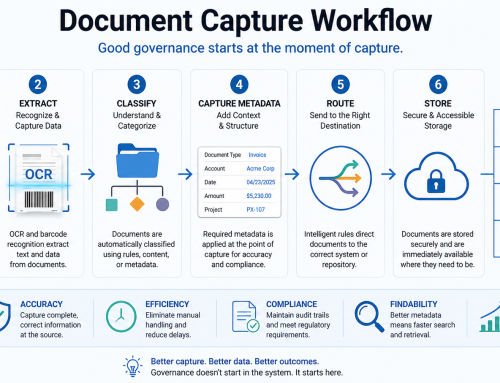
It was:
- Capture the document.
- Separate the pages.
- Identify the document type.
- Extract or assign metadata.
- Match it to the correct record.
- Store it in the correct repository.
- Make it searchable.
- Preserve permissions.
- Support compliance.
- Keep humans from renaming files “scan00047.pdf” until civilization collapses.
This is why document workflow resilience matters. It is not about panic. It is about operational adulthood.
Document workflows are not just IT plumbing
Salesforce Administrators, Office Administrators, IT Managers, and Operations Managers tend to see different sides of the same document problem.
The Salesforce Admin sees the record-level chaos. Documents attached to the wrong account. Legacy Notes & Attachments still hanging around. Files spread across Salesforce, SharePoint, Box, Google Drive, Amazon S3, and local folders with the spiritual discipline of a toddler with glitter.
The Office Administrator sees the human bottleneck. Someone has to scan, name, save, upload, tag, check, correct, and sometimes apologize. Manual document handling is not just slow. It is exquisitely good at creating little mistakes that later become expensive mysteries.
The IT Manager sees the dependency map. Scanner drivers. Windows workstations. User permissions. Cloud APIs. Retention policies. Security risks. Vendor lifecycle notices. Integrations that work beautifully until one endpoint changes and everyone suddenly develops opinions.
The Operations Manager sees throughput. How many documents come in? How long do they take to process? Where do they get stuck? Which steps require judgment? Which steps are clerical theater? Which delays affect customers, compliance, billing, claims, onboarding, or service delivery?
A resilient document workflow serves all four perspectives. It is not simply “where the PDF goes.” It is how paper and digital documents become usable business data.
The real risk is not sunset. It is surprise.
There is nothing inherently wrong with software retirement. In many cases, it is healthy. Old systems carry security issues, compatibility problems, and architectural assumptions from another era. The trouble begins when a business treats software lifecycle as an IT calendar item rather than an operational risk.
The best teams do not wait for a retirement notice to ask whether their workflows are fragile. They ask earlier, quieter, better questions.
What happens if our preferred repository changes?
Can we move documents between Salesforce and another cloud system without reinventing the process?
Are our document names and metadata meaningful outside the current platform?
Do we know which teams rely on barcode scanning, OCR, or manual indexing?
Are we storing files as attachments, Salesforce Files, external files, or something even more thrillingly mysterious?
Can a new administrator understand the workflow without summoning the last person who configured it from LinkedIn?
Future-proofing starts with mapping the actual workflow, not shopping for replacement software. Otherwise, the organization simply migrates confusion from one platform to another. This is the enterprise equivalent of moving clutter from the kitchen counter into a drawer and calling yourself organized. We have all done it. The drawer knows.
Why Salesforce document workflows deserve special attention
Salesforce is often the system of record for customer relationships, sales processes, service cases, renewals, and account histories. But documents are where those relationships become evidence.
A Salesforce account without its signed contract is a rumor in a nice interface.
A case without supporting documentation is a scavenger hunt.
An opportunity without the right proposal, quote, purchase order, or approval file is a future meeting with Finance.
That is why Salesforce document integration deserves more than an afterthought. Documents need to land where users already work, attached to the right records, with enough structure to support search, service, reporting, and compliance.
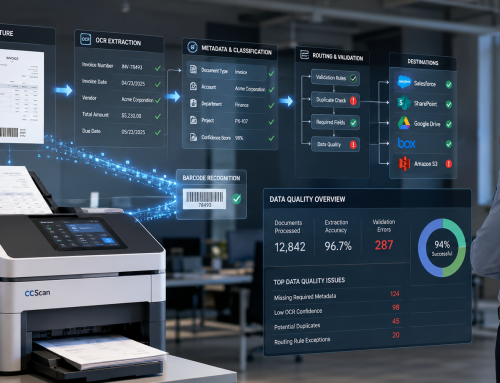
Tools such as ccScan for Salesforce exist in this practical middle ground: between the messy physical world of scanners, paper, PDFs, faxes, and shared folders, and the structured digital world of Salesforce records, libraries, content, and cloud repositories. The value is not just that a document gets scanned. The value is that the document enters the business workflow with context.
That context matters.
A scanned contract named “contract.pdf” is technically digital. It is also technically annoying.
A scanned contract automatically associated with the right Salesforce account, named consistently, indexed with useful metadata, and stored where the team can retrieve it later is a business asset.
The distinction is not glamorous, but neither is plumbing. Try removing it.
OCR, barcodes, and metadata are the underrated heroes
When people talk about document automation, they often jump straight to artificial intelligence, as if every PDF needs a tiny robot poet living inside it. Sometimes advanced extraction is useful. Often, the basic building blocks are still the most powerful.
Barcode recognition can separate batches, identify document types, or route files to the right location. OCR document scanning can convert image-based scans into searchable text. Text pattern recognition can help pull out values such as account numbers, dates, IDs, or reference codes. Metadata can make documents findable, governable, and useful long after the original scanner has been replaced.
That is where future-readiness starts.
The more your workflow depends on hard-coded habits, tribal knowledge, or platform-specific quirks, the more fragile it becomes. The more it depends on clear document types, consistent metadata, searchable content, and well-understood storage rules, the easier it becomes to adapt.
A modern document workflow should be able to answer basic questions:
What is this document?
Where should it go?
Who should be able to access it?
Which business record does it belong to?
How will someone find it two years from now?
What needs to happen if the storage destination changes?
If the system cannot answer those questions, the workflow is not automated. It is merely digitized. That is a very expensive way to make paper harder to throw away.
For teams refining capture rules, it is worth reviewing the differences between barcode and OCR scanning and deciding where each method fits. Barcodes are excellent when the process can be structured in advance. OCR is powerful when the document itself contains text that should become searchable or actionable. Metadata is the connective tissue between the two.
Cloud document management is really workflow management
Cloud storage changed the document conversation. Salesforce, SharePoint, Google Drive, Box, Amazon S3, and similar systems made it easier to store and access files from anywhere. That was progress. It also created new sprawl.
The typical organization does not have one document repository. It has several, each justified by a department, vendor, compliance need, or historical accident. Sales wants documents in Salesforce. Operations wants them in SharePoint. Finance has a shared drive. IT has retention policies. Legal has opinions. Everyone has folders. Nobody has enough coffee.
The future-ready question is not “Which cloud platform do we use?”
It is “How do documents move intelligently into the right platform for the right business purpose?”
A signed customer agreement may belong in Salesforce because the account team needs it. A long-term archive may belong in Amazon S3. A collaboration file may belong in SharePoint or Google Drive. A client package may belong in Box. A local file system may still support specialized operational processes.
A flexible document capture strategy recognizes that repositories can change. Workflows should not collapse simply because a business adds a new destination, changes a storage policy, or reorganizes departments.
That is why cloud document management should be evaluated as an ecosystem, not a folder structure. The goal is not to worship a repository. The goal is to preserve the movement, meaning, and retrievability of business documents.
How to assess whether your document workflow is future-ready
A practical readiness review does not need to become a six-month transformation program with a steering committee and a logo. Start with a map.
Pick one high-volume workflow. Not the easiest one. Not the one everyone understands. Choose the one that makes people sigh.
Maybe it is contract renewals. Maybe it is customer onboarding paperwork. Maybe it is medical records, loan documents, shipment packets, HR files, invoices, compliance evidence, inspection forms, or legal correspondence.
Then trace the workflow from beginning to end.
- Where does the document originate?
- Who touches it?
- What happens before it is scanned or imported?
- How are pages separated?
- How is the document named?
- What information is extracted?
- Where is it stored?
- How is it matched to Salesforce or another system?
- Who verifies accuracy?
- What happens when the document is wrong, duplicated, missing, or unreadable?
- How is it retrieved later?
- Which part of the process depends on one person knowing “how we do it”?
This exercise is often humbling. That is good. Humility is cheaper than emergency migration.
Once the workflow is mapped, look for weak points:
- Manual renaming.
- Manual uploads.
- Unclear ownership.
- Too many storage destinations.
- Inconsistent metadata.
- No documented exception process.
- No test process for scanner, software, or repository changes.
- Business-critical workflows running on undocumented local settings.
- Salesforce records with inconsistent document attachment practices.
- Cloud folders that make sense only to the person who created them.
These are not signs of failure. They are normal scar tissue from years of getting work done. But they are also where future problems will surface first.
Build for portability, not permanence
The most resilient organizations assume change. Not because they are pessimistic. Because they have been awake during the last twenty years of software history.
Portability does not mean constantly changing systems. It means designing workflows so documents retain their business value even when systems evolve.
A portable document workflow has clear naming conventions, useful metadata, searchable text, understood storage rules, documented routing logic, and minimal dependence on mystery settings. It can survive a platform upgrade, a new CRM admin, a scanner replacement, a SharePoint restructuring, or a shift from one cloud repository to another.
This is especially important for regulated or document-heavy industries such as healthcare, legal, finance, education, government, transportation, and professional services. In those environments, documents are not just files. They are obligations.
A future-ready workflow makes those obligations easier to meet.
It also gives administrators breathing room. Salesforce Admins can maintain cleaner records. Office Administrators can reduce repetitive handling. IT Managers can manage dependencies with fewer surprises. Operations Managers can see where throughput improves. Everyone gets fewer mysterious PDFs. Civilization advances.
A simple document workflow resilience checklist
Use this as a starting point.
- Identify your top five document-heavy workflows.
- Map each workflow from document arrival to final retrieval.
- List every system involved, including scanners, desktops, cloud repositories, Salesforce objects, folders, APIs, and manual handoffs.
- Document naming conventions, metadata fields, barcode rules, OCR settings, and routing logic.
- Review whether documents are attached to Salesforce records consistently.
- Confirm whether documents should live in Salesforce, SharePoint, Google Drive, Box, Amazon S3, file systems, or another destination.
- Test whether a new administrator could understand the workflow from documentation alone.
- Identify which steps are manual only because “they have always been manual.”
- Review exception handling for bad scans, missing pages, duplicate documents, and failed uploads.
- Create a lightweight change plan for repository, scanner, workstation, or software updates.
This is not glamorous work. It is better than discovering your entire renewal process depends on a retired browser, an unsupported form tool, or a folder named “DO NOT DELETE_OLD_SYSTEM_ACTIVE.”
The next era belongs to adaptable workflows
The history of enterprise software is not a graveyard. It is a reminder that tools change because the work changes, the web changes, security changes, platforms change, and business expectations change.
Internet Explorer, Flash, Google Cloud Print, InfoPath, and Skype for Business Online all tell the same story in different costumes: organizations do not suffer because software changes. They suffer because the work hidden inside that software was never fully understood.
Document workflows deserve better treatment.
They are how signed agreements become accessible. How customer records become complete. How compliance evidence gets preserved. How teams avoid asking, “Where is that file?” sixteen times before lunch. How Salesforce becomes more than a CRM and starts functioning as a reliable operational hub.
The practical goal is not to predict every future software sunset. That would require a crystal ball, a procurement spreadsheet, and possibly a minor act of wizardry.
The goal is simpler: make sure your document workflows are clear, flexible, searchable, portable, and not overly dependent on any single fragile habit.
Because software will keep changing.
The documents will keep coming.
And somewhere, tomorrow morning, someone will still need to scan a stack of paper, attach it to the right Salesforce record, and find it again before a customer calls back.
That workflow deserves to be ready.
References
- Microsoft: Internet Explorer 11 desktop application ended support
- Adobe: Flash Player End of Life
- Google: Migrate from Cloud Print
- Microsoft: InfoPath 2013 Lifecycle
- Microsoft: Skype for Business Online retirement
- Salesforce Developers: ContentDocument object
- Salesforce Help: Files Connect external files
- NARA: Metadata Requirements for Permanent Electronic Records